
Online story maker with AI built in
With Pendid's online story maker, you can design Instagram Stories for anything you need — advertising and retail stories, product and service introductions, educational content, announcements, discounts and seasonal moments. It's all online, and you don't need heavy graphics software to get started.
To create a Story with AI, you can lean on Pendid's AI tools for ideas or imagery, then finish the result in the Studio with text, colors, shapes, vectors, stock imagery or your own files. Story projects in Pendid start at the standard 1080 × 1920 size with a 9:16 ratio.
And if you're looking for a free online story maker, or just a simple way to try designing a story, you can start with Pendid's basic features and move up to more advanced tools and AI whenever you need them.
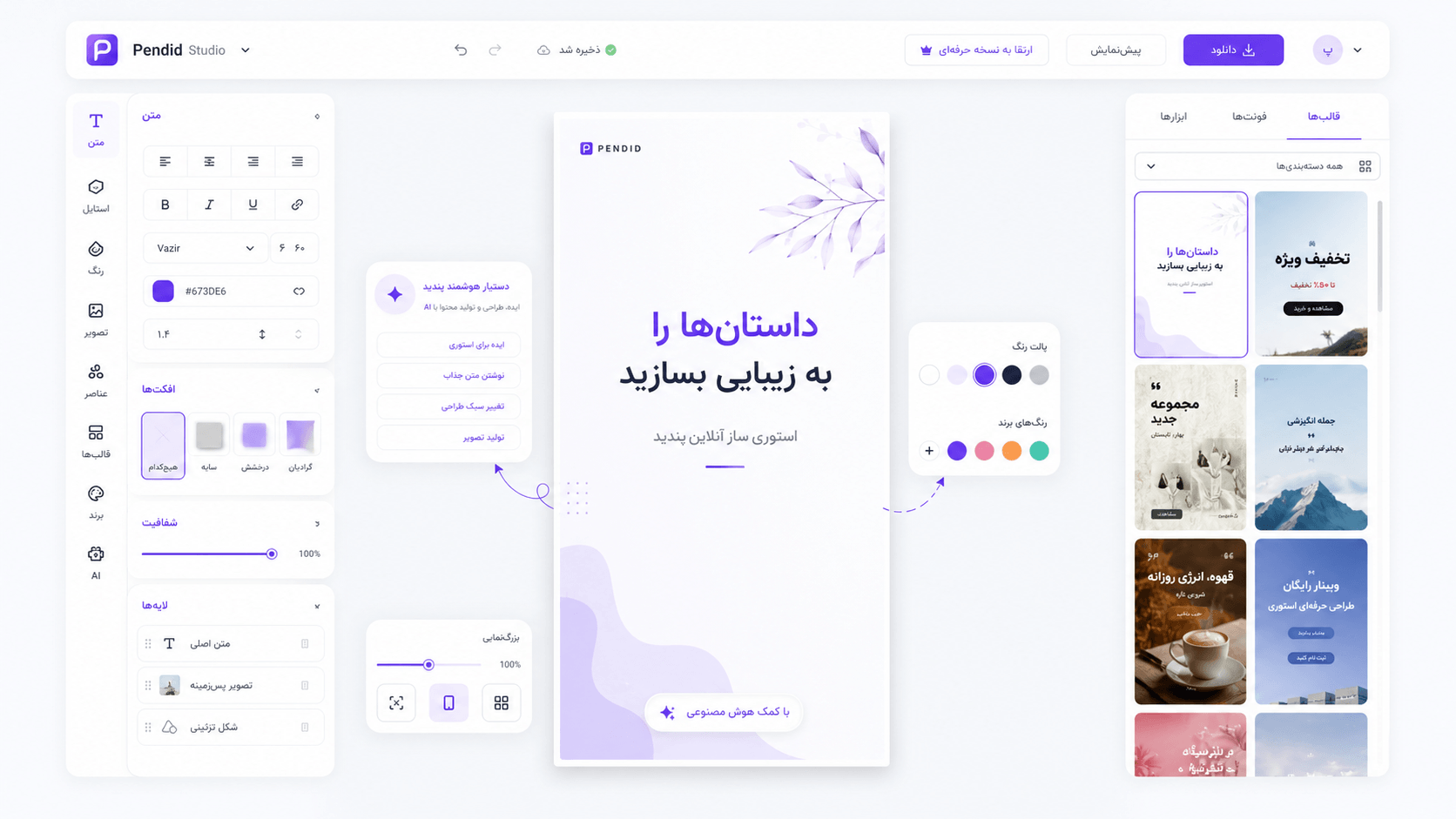
What is an online story maker, and why is it useful for Instagram?
Instagram Stories are one of the fastest ways to reach an audience. A store might introduce a new product every day, an instructor might share a teaching point, a service page might show its work, and a brand might need several stories in a row for a sale or campaign. In cases like these, having a story maker that's quick to reach makes producing content much easier.
An online story maker lets you open a vertical, story-ready canvas right in your browser and design from there. Instead of switching between several programs for every change, you manage the text, images, graphic elements and layout in one place. That matters especially for people who need to make Instagram Stories regularly.
In Pendid, the goal is to shorten the distance between "an idea" and "a publish-ready story." You can start from a standard project for sale, advertising, service, everyday or announcement stories, and adjust the design to match your own visual identity.
If you've searched for things like "Instagram story online," "Instagram story design" or "make a story online," you're probably after something that's both simple and gets you to a real output within a few minutes. Pendid is built for exactly that scenario.
A free online story maker — what do you get to start?
Before choosing any plan, a lot of people first look for a free online story maker, just to see whether the design workspace fits their needs. In Pendid, you can start with the basic features and the online environment, and later — if you need more advanced tools or AI credits — pick the plan that suits you.
"Free" here doesn't mean a promise of "every feature with no limits." Some advanced capabilities — like certain export formats, higher quality settings, or heavier use of the AI tools — can depend on your account level. The main advantage is that to try the design flow, you don't have to start with complex software or a long installation process.
If your goal is simply to make a basic story, test a layout, put text over an image, or prepare an early draft, you can jump into the Studio quickly and explore the environment. For more professional work, that same project can continue with additional tools.
Why Pendid's online story maker suits everyday design
A design tool is truly useful when it speeds you up. If every story means opening several programs, sizing the image by hand and moving files between apps, content production gets tiring fast. Pendid brings the tools you need to design a story together in the Studio.
For stories and reels, start at 1080 × 1920 with the right vertical ratio from the very beginning.
Use text, shapes and vector elements for a headline, price, discount, CTA or visual accents.
Upload your product photo or personal file, or use the stock images available to finish a layout.
Use Pendid's AI to create imagery and reach a visual idea faster.
Creating stories with AI — from an idea to an editable image
When AI helps most: when you have an idea for the story but don't want to design everything from scratch.
You can use Pendid's AI tools to generate an image, find a visual direction or reach a starting point, then continue the design inside the Studio.
The key difference from generating a single static image is that after the image is made, you still control the design step. Place your text, price, product title, logo or brand name, shapes and other elements in the Studio, so the final output lines up more precisely with your goal.
For example, when designing an advertising story with AI, you can first create the right campaign image, then add the discount headline, sale percentage, campaign dates and call to action separately in the editor. That way you keep control of the important wording instead of leaving it entirely to a generated image.
The same path works for product introductions, services, education, seasonal moments, story covers and even creating story banners with AI. AI makes the starting point faster, and the Studio lets you complete and edit the design.

Story images, story covers and story banners in one place
Not all stories are alike. Sometimes you only need a vertical image with a short headline; sometimes you want a story cover to open a series of slides; and sometimes your goal is an Instagram story banner for a discount, campaign or product launch.
To create a story image, you can upload your main image or use image sources and AI tools, then place the text and graphic elements over it. This approach works well for simple stories where the image plays the leading role.
For a story banner, it's better to set aside clear space for the headline, the main offer, the price or discount percentage, and one clear CTA. Because people see a story quickly, the main message needs to be understandable in a few seconds — and the design shouldn't get so busy that the product or offer gets lost.
For story covers, you can build a consistent style across a content series — a cover for product introductions, daily tips, Q&A, or brand news. Using coordinated colors, typography and layout makes a set of stories look more organized.
What kinds of stories can you make with Pendid?
Pendid isn't limited to one type of content. Anywhere you need a vertical 9:16 design with text and imagery, you can use the story project as a starting point. Here are a few common uses.
Introduce a product, announce stock, show a price or special offer, feature a new item and guide people to buy.
For sales campaigns, discount codes, limited offers, seasonal deals and a sense of urgency.
For introducing a campaign, service, brand, product or any message that needs to be seen fast.
For showing the product image, features, benefits, price and one short, direct sales message.
For quick tips, step-by-step lessons, course introductions, Q&A and serial content.
For explaining a service, showing your work, highlighting benefits and building trust.
For special occasions, celebrations, seasonal campaigns, greetings and daily connection.
For updates, behind-the-scenes, reminders, visual polls and regular social content.
Designing advertising stories for sales, products and services
One of the most important uses of stories for businesses is short, direct advertising. An advertising story works best when the viewer understands, at a glance, what you're offering and why they should keep watching or tap your link.
In a retail story, it's better to keep the product image clear, make the price or main offer stand out from the rest of the text, and not let extra information crowd out the core message. For services, you can use a short headline, a key benefit, a sample result or a very brief explanation, plus one clear action like "See our work" or "Place an order."
If you're running a discount campaign, a story banner can follow a simple hierarchy: campaign name, discount percentage or amount, product or service, end date and CTA. Pendid's text, shape and image tools are on hand for exactly these kinds of simple, practical combinations.
For advertising stories, each slide doesn't have to look completely different. In fact, it's better to keep colors, fonts and the placement of key elements consistent across several stories, so the viewer feels they're seeing one coherent set.
Standard Instagram Story size: 1080 × 1920 at 9:16
Recommended working format: use a 1080 × 1920 pixel canvas with a 9:16 aspect ratio for a full-screen vertical story design.
For designing an Instagram Story, it's best to choose the right aspect ratio from the start. Pendid has a dedicated preset for stories and reels at 1080 × 1920 pixels and a 9:16 ratio, so you don't have to guess the project dimensions each time.
Sticking to the standard size isn't just about looks. When your design is vertical from the beginning, it's easier to position the headline, image, price and CTA — and there's less risk of the main composition being cropped or displayed awkwardly.
It's best not to push very important text and logos right up against the top and bottom edges, since Instagram's interface covers part of the frame with the account name, buttons and story controls. Leaving a little safe margin from the edges keeps your design more readable on mobile.
A vertical format suited to stories and full-screen mobile content.
A common working width for an Instagram Story output.
The standard height that completes the full 9:16 ratio.
Enough room for the main image, headline, a short note and a call to action.
Steps to make a story online in Pendid
Making a story online doesn't have to be a complicated process. First decide what the content is for, then open the vertical project and add the pieces you need, step by step.
Choose the 1080 × 1920 vertical project for stories and reels so the canvas size is right from the start.
Write the headline, description, price or CTA, and add a product photo, personal file or a fitting image.
Use shapes, vectors, stock images and — if needed — AI to complete the design.
Review the final design, choose an export format available to your account, and get the story ready to publish.
Pendid Studio tools for story design
A professional story maker is more than just a page for writing text over a photo. To adjust a design to fit your needs, you need different design pieces on hand. Pendid Studio brings several tool groups together so the story project stays editable.
Text for headlines, prices and calls to action
You can add text as a separate element, so the advertising headline, price, discount code, short description or CTA doesn't have to be baked into the image itself. That gives you more control over readability and layout.
Shapes and vector elements
Use shapes and vector elements to build frames, headline backgrounds, price labels, separators and visual details. These tools are very handy for story banners and advertising stories.
Image uploads and stock photos
If you have a product photo, sample work or a dedicated image, you can bring your own file into the project. Alongside that, the stock image section helps when you need a general photo for a background or the main composition.
Ready-made SVG templates and elements
Pendid has a separate section for ready-made SVG templates and elements that can speed up the start of your design. This is different from the old user-submitted template system and remains available as a ready-to-use tool inside the Studio.
JPG, PNG and WEBP export based on access level
At the end, you can export your design. JPG is available, and depending on your account, PNG, WEBP and higher-quality settings can also be used — so you can pick the format that fits your publishing or next need.

An online story maker for businesses and content teams
Businesses usually need content that's quick to make, keeps its text readable, and can be adapted for sales, education or introducing a service. A store might have several new products a day, an instructor might publish a few teaching slides, and a service page might want to show its work as stories.
For that kind of use, story design has to be simple and repeatable. When each story takes too long to make, your publishing rhythm falls apart. Having an online workspace helps you start projects faster and repeat the same familiar flow for different topics.
A story for a business isn't just a pretty image — it can be a tool for sales, announcements, building trust and staying in daily contact with your audience. What matters is that each slide has a clear purpose and the design elements help carry that message.
If you're a social media manager, store owner, freelancer, instructor or content creator, Pendid's story maker can help you design faster and keep a more consistent content schedule through the week.
How to design a readable, effective story
Good tools are only part of the job. The quality of the final result also comes down to a few simple design decisions. A story usually has just a few seconds to catch someone's attention, so the main message should be easy to recognize very quickly.
Give each story one main message
If you put several headlines, several products and several different invitations on one slide, none of them get seen clearly enough. It's better to pick one main goal — like introducing a product, announcing a discount or inviting a sign-up.
Write a short, bold headline
Story text needs to be read quickly on a phone screen. A short headline, good contrast and enough space between the text and background usually work better than a long paragraph.
Don't sacrifice the main image to clutter
When making a story image or introducing a product, the image should keep its role. Use frames, shapes and decorations only when they help the message land better.
Keep a consistent style across a story series
If you make several slides in a row, keep the colors, headline size and placement of key elements as consistent as possible. This makes design faster and makes the set of stories look more professional.
Worth remembering: a good story isn't necessarily busy or complicated. Readability and speed of getting the message across matter more than the number of effects and graphic elements.
Online story maker or AI — which approach is better?
They aren't really rivals. An online story maker is for layout, text, imagery, color and precise control of the output, while AI for story creation can speed you up in ideation and image generation.
If you already have a ready image and just want to place a headline, price or description on it, you may not need AI at all. But if you don't have a fitting image for a campaign or specific topic, generating an image with AI can get you off to a faster start.
Combining the two usually gives you more flexibility: first prepare the image or idea with AI, then set the text and precise brand elements yourself in the Studio. That way the creative part goes faster, but the final control of the design still stays in your hands.
How online story design differs from heavier software
Professional graphics software offers a wide range of capabilities, but it isn't necessary for every user or every project. If your goal is to quickly make an Instagram Story, a story banner or daily content, starting a simple project in the browser can take less time.
With online design, you don't have to move a file between several programs for one small change. You can edit the text, swap the image, rearrange graphic elements and get a fresh version. That matters for pages that need to react quickly to a new product, discount, news item or event.
Of course, if your project needs highly specialized editing, complex effects or professional print processes, dedicated software still has its place. Pendid focuses more on fast online design, social media content production and simpler access.
Pendid — an online design tool built for its users
Pendid has been working since 2018 on making online design simpler. Over that time, image design tools, AI features and various content-production sections have been added, so you can handle everyday content needs within one ecosystem.
The online story maker is part of that same path. The goal isn't to bury you in dozens of technical settings for a simple story — it's to let you open the right project, add your own content, get help from AI when you need it, and create a usable output.
Whether you've just launched an Instagram page or you produce content for several brands every day, having an online design tool can make part of your repetitive design work faster and more organized.
Frequently asked questions about the online story maker and creating stories with AI
What is an online story maker?
An online story maker is a web-based tool for creating and designing Instagram Stories. In Pendid, you can start with the right story size, add text and images, use vectors, shapes, stock images and your own files, and export an output that is ready to publish.
Is Pendid's online story maker free?
You can start using Pendid with the basic features and enter the design workspace without installing any software. Some professional features, export formats or AI capabilities may depend on your plan or available credits.
Can I create Instagram Stories with AI in Pendid?
Yes. You can use Pendid's AI tools to brainstorm ideas and generate imagery, then bring the result into the design editor and finish it with text, colors, vectors and graphic elements.
Can I try creating Stories with AI for free?
Pendid lets you get started and try the basic tools. How much you can use the AI features and professional capabilities depends on your plan and account credits, so it's best to check your current account and plan status inside the Studio.
What is the standard Instagram Story size in Pendid?
Pendid has a vertical preset for stories and reels at 1080 × 1920 pixels with a 9:16 aspect ratio. This size is ideal for designing Instagram Stories and other vertical content.
Do I need to be a professional designer to make a Story?
No. Pendid is built for people who want to bring together text, images, shapes and graphic elements — without wrestling with complex software — and create a tidy, publish-ready story.
Can I create advertising Stories with Pendid?
Yes. Designing advertising Stories to introduce a product, announce a discount, promote a service, course or event, run a sales campaign, or invite people to buy or sign up is one of the main uses of the online story maker.
Can I upload my own images and files for a Story?
Yes. Pendid Studio includes a file-upload section, so you can add the image you need to your design. Text, shapes, vectors and stock images are also available to complete the layout.
Can I keep a consistent look across a series of Stories?
Yes. By reusing the same colors, typography, spacing and layout across several slides, you can keep a Story series or campaign looking consistent and recognizable, while still editing the text and images on each slide.
Can I make Story banners or Story covers?
Yes. You can use the vertical story format to create Story banners, Story covers, announcement graphics, product introductions and promotional designs, and adjust the mix of text and imagery to fit your needs.
What are ready-made templates in Pendid for?
Pendid has a dedicated section for templates and ready-made SVG elements that can give your design a faster start. This is different from the old user-submitted template system and is meant to be used directly inside the design Studio.
Which export formats are available for a Story?
Pendid Studio supports JPG export, and depending on your account access, PNG, WEBP and higher-quality settings are also available.
Who is Pendid's online story maker for?
Online stores, service pages, instructors, content creators, freelancers, social media managers and personal brands can all use Pendid to create Instagram Stories.
How do I get started making an Instagram Story?
Open Pendid Studio, choose the vertical story project, add or edit your text and images, use AI if you need it, and export an output ready to publish at the end.
Make your Instagram Story with Pendid's online story maker
Start from the standard story size, add your image and text, use the design tools and AI when you need them, and get the design ready to publish.
Start making a story online